
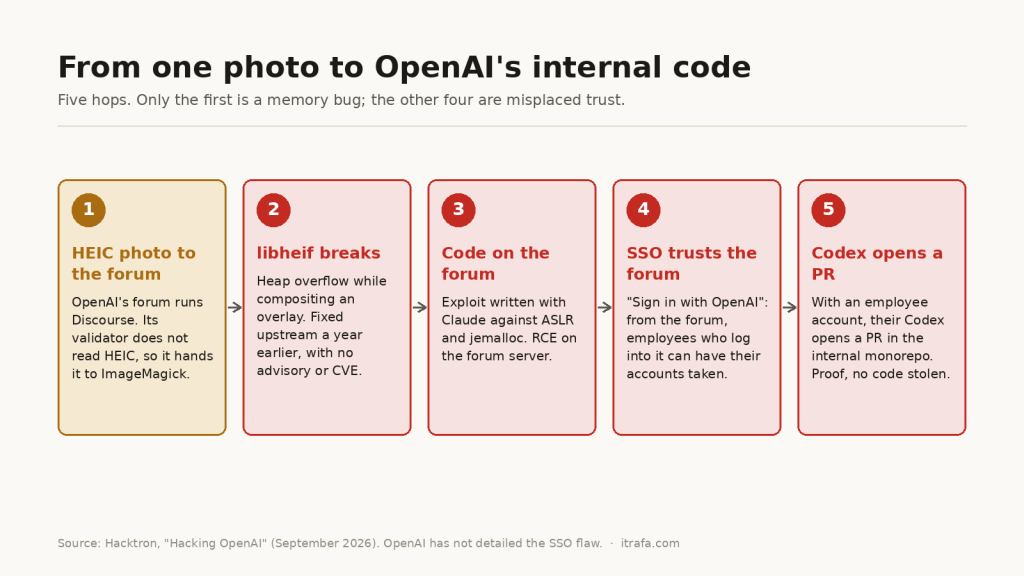
In July, three researchers from Hacktron uploaded a photo to OpenAI’s community forum. Less than 72 hours later they had a pull request open in the company’s internal repository, written by an employee’s Codex. In between there were no stolen passwords and no phishing: there was an unpatched image library and a sign-in that trusted too much.
Most coverage went for the flashy angle, that an AI wrote the exploit. I care about the other one: the three pieces that made this attack possible are also on your server, or in your company. So besides explaining what happened, I checked mine.
What happened, step by step
I rebuilt it from the researchers’ own report, “Hacking OpenAI”, and the official Discourse and Debian advisories.
- The photo. OpenAI’s forum (
community.openai.com) runs on Discourse. Discourse validates images with a library that does not understand HEIC, the iPhone’s default photo format, so it hands them to ImageMagick for conversion. ImageMagick, in turn, uses libheif to read them. - The bug. The libheif in the Discourse image (1.19.7) had a heap overflow when compositing overlay images. The project had fixed it the year before, but as a maintenance change: no security advisory and no CVE.
- Code on the forum. With that bug they wrote an exploit that gets past ASLR and the jemalloc allocator, and got code execution on the forum server.
- The jump to OpenAI. The forum has “Sign in with OpenAI”. From the compromised forum they could take over the ChatGPT and Codex accounts of employees who logged into it.
- The proof. Instead of taking code, they asked the Codex of an employee connected to GitHub to open a pull request in the internal monorepo. Write access demonstrated, and they stopped there.
The dates, per the report: the exploit worked in the early hours of July 25, they reported it through Bugcrowd that same morning, and OpenAI confirmed a fix about fourteen hours later. Discourse published its advisory on July 28 (GHSA-vhm9-85gw-x335, CVE-2026-32882, severity 8.8), with fixed versions and image processing moved into a sandbox. OpenAI paid $6,500, with a caveat: attacking the forum was out of scope for its program, and the award covers the OpenAI-side finding.
What we know and what we don’t
Before drawing lessons, it pays to separate what is confirmed from what gets repeated without a source, because this story has plenty of the latter:
- Nobody has said exactly how the SSO flaw worked. Neither Hacktron nor OpenAI has detailed which token or session was abused. What the researchers do say is that the problem was in OpenAI’s identity architecture, not in Discourse, and that any service using the same sign-in could have granted the same access.
- The campaign is bigger than OpenAI (they called it “HEIF Heist” and it points at Slack, Meta, GitHub Enterprise and others), but those other cases have not been independently confirmed.
- It was not a magic click. According to the researchers themselves, you have to fingerprint the target’s exact version and tailor the images, and some code execution attempts only landed after thousands of uploads.
That last point matters and almost nobody mentions it, because it is the good part for defenders. More on it below.
Lesson 1: no advisory, no patch
This is the heart of it. The fix had existed since the previous year. But a Linux distribution does not pull every commit from every project into its stable releases: it pulls the ones marked as security. A fix published as “maintenance” never reaches the version you run, and your daily apt upgrade does not protect you from a bug nobody declared.
And there is a second, subtler layer: the version you run depends on who compiled the library. Discourse was not using Debian’s libheif, it shipped its own inside its image. So even if Debian had patched it, Discourse would not have received it.
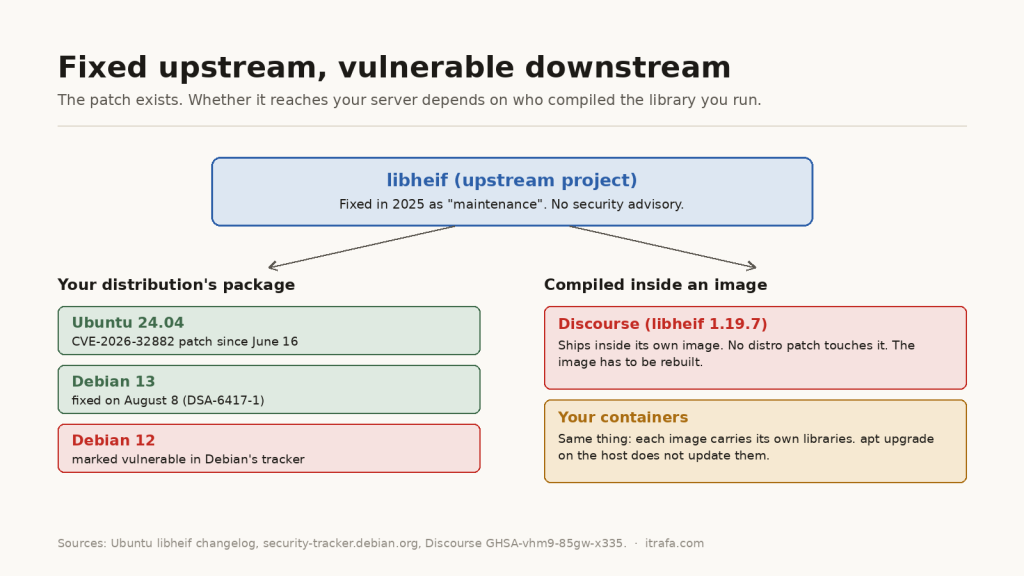
The data in the diagram comes from the sources, not from memory. Debian’s security tracker marks CVE-2026-32882 as fixed in Debian 13 (advisory DSA-6417-1, August 8), but Debian 12 still shows as vulnerable as I write this. Ubuntu 24.04, on the other hand, shipped the patch on June 16, before the research even started. Same bug, three different calendars.
I checked my own server
This blog runs on Ubuntu 24.04 with WordPress. The question is simple: how many pieces of that chain do I have? First, whether libheif is installed:
dpkg -l | grep -i heif
Output on the itrafa server:
ii  libheif-plugin-aomdec:amd64      1.17.6-1ubuntu4.8
ii  libheif-plugin-aomenc:amd64      1.17.6-1ubuntu4.8
ii  libheif-plugin-libde265:amd64    1.17.6-1ubuntu4.8
ii  libheif1:amd64                   1.17.6-1ubuntu4.8
It is, and I never installed it. Who brought it in?
apt-cache rdepends --installed libheif1
Output on the itrafa server:
libheif1
Reverse Depends:
  libgd3
  libheif-plugin-libde265
  libheif-plugin-aomenc
  libheif-plugin-aomdec
  libgd3
  libheif-plugin-libde265
  libheif-plugin-aomenc
  libheif-plugin-aomdec
libgd3, the image library behind PHP’s GD extension. In other words: WordPress has libheif one step away even if you have never heard of it. This is the point I wanted to make, and it holds for any server: your attack surface includes your dependencies’ dependencies. Next, whether this case’s patch is in my version:
apt-get changelog libheif1 | grep -B3 CVE-2026-32882
Output on the itrafa server:
  * SECURITY UPDATE: Heap overflow in HeifPixelImage.
    - debian/patches/CVE-2026-32882.patch: Fix overlay image with alpha
      channels with stride different from color channel in
      libheif/pixelimage.cc
    - CVE-2026-32882
It is. And the other half of the chain, the part that carried the HEIC to the decoder, does not exist here: no ImageMagick installed, no PHP Imagick extension, and WordPress has no editor able to open HEIC. You can check it like this:
php -m | grep -i imagick
wp eval 'echo _wp_image_editor_choose( array( "mime_type" => "image/heic" ) ) ?: "none";'
On mine, the first line returns nothing and the second says none. If yours shows WP_Image_Editor_Imagick, your WordPress converts the HEIC files your authors upload with ImageMagick, and this story concerns you more than it looks.
Finally, what nobody looks at: containers. Every image carries its own libraries, and an apt upgrade on the host does not touch them. This loop looks for libheif inside everything you have running:
for c in $(docker ps --format '{{.Names}}'); do
  echo "--- $c"
  docker exec "$c" sh -c 'find / -name "libheif.so*" 2>/dev/null'
done
My server only runs Gotenberg, the document-to-PDF converter, and it does not ship libheif. But that is exactly the kind of container where it could be: if you process images inside Docker, this is the command that tells you whether you are in Discourse’s situation.
Lesson 2: image parsers are attack surface
A site that accepts uploads hands strangers’ files to C code built to read complicated formats. That is what you want to shrink:
- Do not decode formats you do not need. If you use ImageMagick, its policy file lets you forbid specific formats. That is the researchers’ explicit recommendation for HEIF and AVIF when they are not needed.
- Isolate the processing. That is what Discourse did after the report: it moved image processing into a sandbox. If the parser breaks, it breaks inside a box, not with access to the whole server.
- Watch for crashes. Remember that the attack needed, in some cases, thousands of uploads. That leaves a trail: lots of conversion processes dying in a short time. According to The Hacker News, at least one company, Shopify, noticed the activity precisely through repeated crashes of its image processor. An alert on that is cheap and catches the attack before it works.
If you have ImageMagick, this is the line that forbids reading those formats, inside <policymap> in its policy.xml:
<policy domain="coder" rights="none" pattern="{HEIC,HEIF,AVIF}" />
I do not trust a config line I have not seen work, so I tested it in a throwaway Debian 13 container with ImageMagick 7 (its policy lives in /etc/ImageMagick-7/policy.xml). Without the rule, it converts a test HEIC without complaint. With it:
Output in a throwaway Debian 13 container:
convert: attempt to perform an operation not allowed by the security policy `HEIC' @ error/constitute.c/IsCoderAuthorized/454.
And in the same container, a PNG still converts to JPG just fine: the rule only cuts what you ask it to. To see the active policy use magick -list policy on ImageMagick 7 or convert -list policy on 6, and check that your application still accepts the images you do need before calling it done.
Lesson 3: the weak link is the one you invited
Without the shared sign-in, this attack would have been a compromised forum: serious, but contained. The jump into OpenAI’s systems existed because a third-party service, the forum, was wired to the same identity that grants access to what matters.
Since the exact mechanism has not been published, this is my reading, not a confirmed fact: every app you let “Sign in with your work account” is a system you trust with your identity. If that app falls, the question is what whoever controls it can do with what it receives. In Microsoft 365 this is very concrete: review which enterprise applications have consent in your tenant and what permissions they hold, and do not mix peripheral tools, like a forum or a board, with the identity of accounts that touch code or sensitive data.
There is a straight line to what I wrote about device code phishing: when what gets stolen is an already-issued session or token, MFA has already happened. Strong authentication guards the door, not what walks out of it afterwards.
Lesson 4: security through complexity is running out
The researchers sum it up in one line of their report: software has long benefited from a kind of “security through complexity”, and AI is turning the scarce expertise needed to break it into compute. By their account, one model gave them an exploit that only worked with ASLR disabled; with the next version, released that same night, they had a working one for a local Mac in about three hours, and ported it from there to the forum’s real environment.
You do not need to buy the whole narrative to keep the practical consequence: the time between a known bug and a usable exploit is shrinking. A patch you could once apply “next week” is worth less today. It is the same conclusion, seen from the other side, as my article on the real security cost of AI-generated code.
What to do this week
- Look for libheif on your servers with
dpkg -l | grep -i heifand see what pulls it in withapt-cache rdepends --installed libheif1. - Check whether your version has the patch using your distribution’s
changelog, not the version number: an Ubuntu 1.17 can be patched and a hand-compiled 1.19 not. - Review your containers with the loop above. What they carry does not update itself: the image has to be rebuilt.
- If you process user-uploaded images, forbid the formats you do not need and isolate the processing.
- Review the third-party apps that use your company sign-in and what permissions they hold.
Sources
- Hacktron: “Hacking OpenAI”, the researchers’ report.
- Discourse: advisory GHSA-vhm9-85gw-x335 (CVE-2026-32882).
- Debian: DSA-6417-1 and the CVE-2026-32882 tracker.
- The Hacker News and CyberScoop, on the campaign and its limits.
- The libheif changelog on Ubuntu 24.04 (
apt-get changelog libheif1), checked on my server.
More from IT Rafa
- Device code phishing: when the token is what gets stolen, MFA no longer protects you.
- AI-generated code: the real security cost.
- Check your domain’s email health, the blog’s tool.