
This page runs two different checks. The first one looks at whether your email address shows up in any data breach that has been made public. The second looks at whether a specific password is already circulating, and it does that without the password ever leaving your browser. I explain exactly how further down, because typing a password into someone else’s website is something you should be suspicious of.
Both use data from Have I Been Pwned, the public breach archive Troy Hunt has been running since 2013.
Check your email
Type the address and hit check. If something comes back, keep reading, because the result is easy to misread.
Has your email been leaked?
What the result means, and what it does not
Your email showing up does not mean someone got into your account. It means a company you handed your address to had a breach, and that data ended up published. It is an important distinction and almost nobody spells it out.
The result separates two things:
- Breaches. A break-in at a specific service, with a date and a list of which fields were exposed. Sometimes only the email. Sometimes the email and the password.
- Pastes. Lists somebody dumped on a paste site. Here you cannot always tell where they came from.
What actually decides whether this matters to you is whether you reused that password somewhere else. If every account has its own, a 2013 breach is a historical footnote. If you reused it, that breach is the key to everything else.
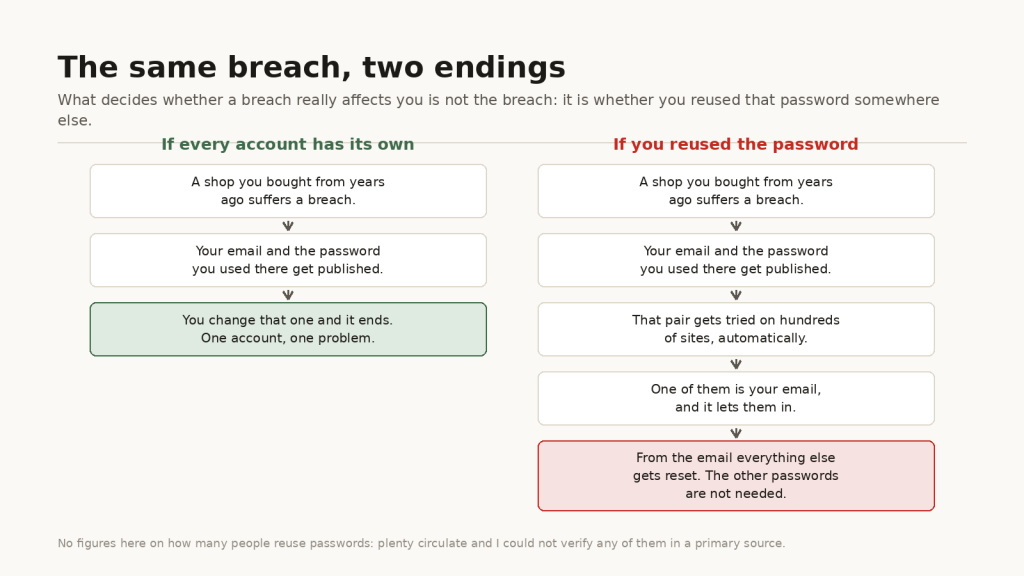
Your email sits at the centre of all this for one concrete reason: it is the only account that resets the others. Whoever gets in there does not need to guess any other password, they have them reset for them.
Check a password without sending it anywhere
Here is the part that has to be explained before asking anyone to type a password. The password is not sent. Not to my server, not to Have I Been Pwned’s, not to anyone’s.
The method is called k-anonymity and it works like this: your browser computes the SHA-1 hash of what you typed, sends only the first five characters of those forty, and the server replies with every hash starting with those five. The final comparison happens in your browser, against the list it already downloaded.
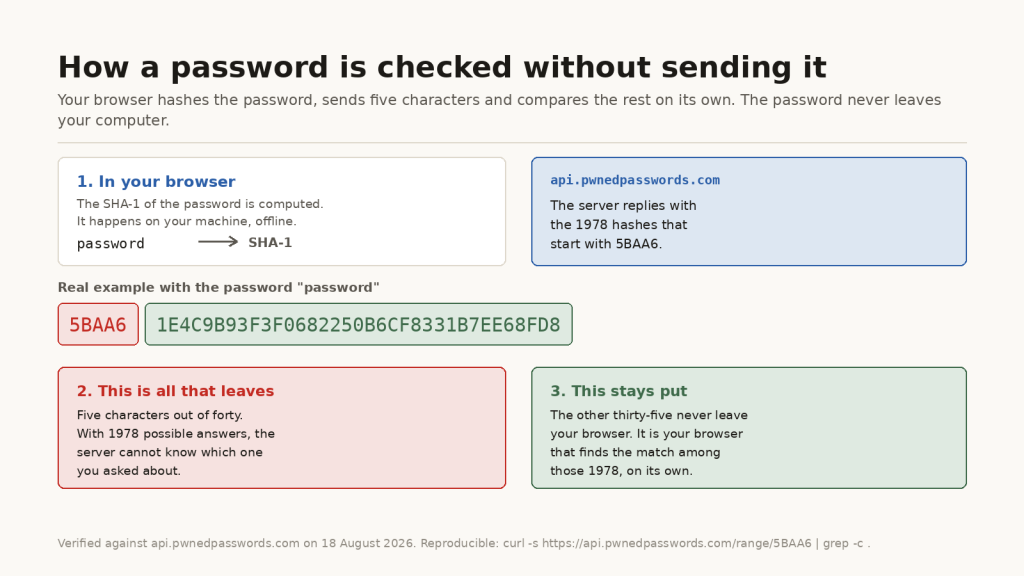
And you do not have to take my word for it. Any terminal will do.
5BAA6: the match is found by your own machine among the 1978 it returned. I use grep -c . rather than wc -l because the response has no trailing newline, so wc counts one short.With 1978 possible answers, the server has no way of knowing which one you were after. That is the whole trick, and it is the same one your password manager uses when it warns you that one of your passwords has been compromised.
What about your password?
Type a password
The password is never sent anywhere: only a fragment of its hash travels, the same method Have I Been Pwned uses.
One practical warning: if a password of yours shows up here, change it even if nobody has broken in. Being on these lists means it is in the dictionaries used for brute-force attempts, and that makes it useless no matter how long it is.
What to do if you show up
In this order, and do not skip the first one:
- Change your email password first. Whoever controls your email can reset the password on everything else. It is the one holding up the rest.
- Work out where else you reused that password and change it there too. This is the step that actually closes the hole, and the one people put off longest.
- Turn on two-factor authentication wherever you can, starting with your email again. With a second factor, a leaked password is no longer enough on its own.
- Check the login history on the affected accounts. Nearly every large service has one and nearly nobody looks at it.
- Stop making passwords up. The ones people invent are far less random than they feel, and randomness is not a detail here: I already wrote about what happened when a device built to generate secure keys was generating predictable ones.
What happens to what you type on this page
Let me be precise, because the two boxes do not behave the same way:
- The password never leaves your browser. That is the mechanism explained above: five characters of a hash go out, never the password.
- The email address does travel to my server, because the lookup against Have I Been Pwned is made by the site and not by your browser. That is the price of keeping that API key out of the page source.
- That address is only stored if you tick the box to get the report. If you do not, it is used for the lookup and thrown away.
If you would rather not type your address anywhere, the original site does the same job and is every bit as good. This page exists for the explanation, not for the tool: what is worth having is knowing why the password box is safe to use, and being able to check that claim yourself.